Planning the Party

The first question you should ask yourself -- after you've asked yourself if you think you should really tackle taking a business online, that is -- is what is your Web site's purpose? Why do you want people to come to your site? For a lot of people that question would make them think "well, duh, to buy things! Why else?" But, that's a little short sighted. Web sites are created with all sorts of purposes in mind. Those that don't really have clear purposes end up being big meandering passageways of cyber-fluff. Here are a few ideas to help you give your Web site purpose.

Prospecting
Maybe you want to generate prospects for your sales reps to call on because your product or service is too complex for anyone to buy online. In this case you would design your site as more of an online brochure that would extol the virtues of your product or service and bring the visitor to act by filling out a form to request more information, join a newsletter, or even post a question. Your site can be quite simple if this is the case.

Sell, Sell, Sell
What if selling products directly from your site is your plan? Does that make planning the site more difficult? Probably so. You'll have to consider the number of products you're listing. Does it warrant having a database of product descriptions and prices? You'll probably have to have some sort of shopping cart software that let's people put products in their "virtual cart" with the click of the mouse. You'll need to be able to accept credit cards or other online payment so your visitors can enjoy that immediate satisfaction of having completed something on their to-do lists. You'll need to have information about product returns, customer service, technical support, etc.

Customer Support
Maybe you just need a place for customers to go for detailed product information, troubleshooting guides, assembly or other instructions to download, or to just access a knowledge base. You can also have a live person answering questions via instant messaging. A Web site is great for this as well. You can significantly reduce your costs for customer service by having a well-stocked Web site that covers both the routine and even some of the less routine questions or problems that come up in your business.

Educating Surfers
As I mentioned before, many many people go to the Web for information. When they go there, however, the information had darned well better be free! If you decide information is your business then you'd better have something very interesting, unique, and in demand -- like "sure fire ways to make money with the leaves in your gutters" or "how to make your own high-speed Internet connection for free using only duct tape and fishing line!" OK - these may be extremely lame examples but they got your attention, and if they worked you'd have a gold mine!

Seriously though, you can bring people to your site by loading it with good, unique information, in which case you could either follow a pay-per-piece revenue model, a subscription revenue model, a syndication revenue model, or an advertising revenue model. If the information is truly unique and good information, then this will increase the likelihood of turning visitors into customers and hopefully creating loyal "repeat" customers or subscribers. Or, if you are planning a revenue model based on Web advertising then you have to have content that people want to come and read. People as a whole are naturally hungry for information.

You may also think of educating your visitors as a side function of your site. Think about this as you would a client newsletter. You may already send out an informative newsletter as a service to your clients (and subtle marketing tool), and you probably spend quite a bit of money doing it. By putting that information on your Web site and directing your customers there, you'll not only save money, but save trees too! You can create vast archives of information that will be extremely useful to your clients and potential clients. Your subscription list will also grow more quickly because others will find your site via search engines and outside links. (We discuss this in more depth in our article about promoting your online business.)

Who is Your Audience
If you now know your purpose, you should also have a good idea of who your audience is, and build your site around them.

Say, for example, you are a realtor in the suburbs of a large metropolitan area and you want to build a Web site. Your Web site's purpose might be to promote your listings to home-owners-to-be in your immediate area as well as those across the U.S. who have plans to relocate to your area. With that in mind, you would want to include information not only about the houses you have listed, but the entire area, schools, job market, entertainment, cost-of-living calculators, etc. You want to fill the needs of your audience and encourage them to stay at your site and request more information. You are using your site for prospecting.

Think about who your customers are and what types of things would encourage them to stay at -- and return to -- your site. What are their interests? If your market includes teenagers then you could play up the fun aspects of the site, add some interactive games, resources for homework, colleges, etc. All, of course, as they relate to your business. If your market is working moms then you could include useful information about balancing work and family, childcare tips, etc. Again, as they relate to your business.

Content is Still King
What you put on your site is critical. The purpose of your site will dictate the content, so make a list of everything you would need to meet the site goal, as well as the needs of your target audience. Here are some questions to help you think through it.

  • (If you currently have a brick and mortar presence) What questions do you get by phone that could be answered via a Web site? -- hours, locations, product lines, pricing, etc. -- These should be prominent and easily accessible from the home page.
  • Do you need interactivity on your site? -- In other words, do you need to include searchable databases of information, forms for feedback and other information, downloadable content, shopping capabilities, etc.
  • Do you want to educate your visitors? -- This could be detailed product information, instructions, or other information to help them make a decision about your product -- or anything else for that matter.
  • How much information about your company do you need?
  • Can you include product photos, video clips, audio, or online demos? -- Many people like to try before they buy.
  • Do you need to include a customer support database?
  • Do you need forums or live chat capabilities?

Structuring Your Pages
Once you know the purpose, the audience, and have an idea of the categories of content for your site you'll need to plan out the pages for the content and site functions. This is known as the Information Architecture in the techy Web world. Organize the pages in order of importance as they relate to your Web site's purpose in life.

Put yourself in your target audience's shoes and think through the processes you want them to go through. For instance, you want them to first of all find your site, but I'll talk about that later. Then you want them to easily find the information they are looking for while being amused and titillated at your comedic antics or the elegance of your site design. You want them to be moved to act on your offer -- whatever that may be -- and bookmark your site for future visits.

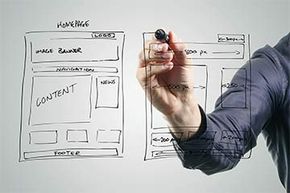
Start your brainstorming by getting a large piece of paper and a pencil and drawing a small square at the top center for your home page. Add squares below it for each category page and connect them as you would an organizational chart. The lines connecting the boxes represent links between those pages. For each page that would link from the category pages, draw another box below the category page box. Make lists for the content of each page. Continue this until you get your entire site mapped out.

This may require a lot of erasing and redrawing, but it will make you think through the navigation process. It won't guarantee that you won't have more changes down the road, but it will help get your site design off to a quicker start, and will help you or your designer set up the actual site. Once you have a picture of your site and its functions in mind, move on to our next session that covers the tools your site will need to have in order to perform those functions.